

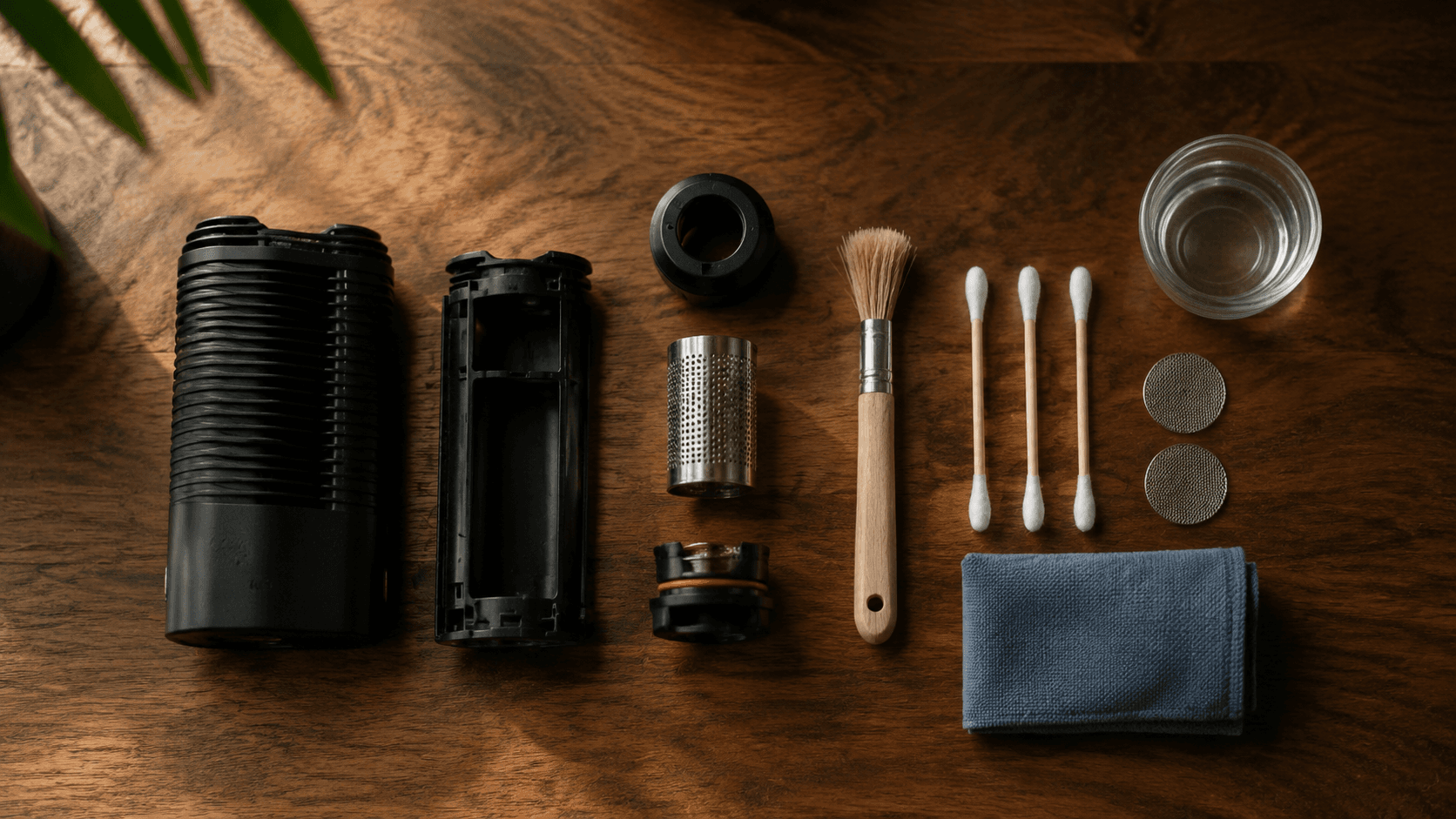
Most vaporizer problems we see come down to 3 things: a dirty oven, the wrong temperature, or the way the oven is packed. Whether your vape makes no vapor, won't turn on, or tastes like burnt popcorn, the answer is below. New to vaping? Start with our guide to using a vaporizer, then change one thing at a time.
Quick fixes by symptom:
- Won't turn on: check the button sequence, then charge it and try another cable if nothing lights up.
- Weak or no vapor: raise the heat in 5°C steps, wait past the ready signal, loosen the pack and stir.
- Harsh or burnt taste: drop to around 190°C and brush out the oven.
- Hard draw: soak the mouthpiece and screens in isopropyl alcohol where your manual allows it.
- Battery dies fast: keep it out of the heat and off the charger once it's full.
- Hot mouthpiece: let it cool between sessions and lower the temperature.
- App won't connect: pair Storz & Bickel vapes from the S&B Web App in a supported browser like Chrome or Bluefy.
- Error code or warning light: look up your brand's code and the maker's fix.
- Swollen battery or a repeat error code: stop using it and contact the manufacturer.
Your vaporizer won't turn on
When a vaporizer refuses to power on, check the simple stuff before assuming a hardware failure. A flat battery, the wrong button sequence or a worn cable can all look like a dead vape.
Check the button sequence. Holding a button is different from clicking it. The Mighty+ turns on when you hold the power button for at least half a second, while the Fury 3 needs 3 rapid clicks. If your model has a lock mode, the manual lists the sequence to release it.
Charge the battery. Plug it in with the charger your manual specifies. A deeply drained battery can need a preliminary charge before the vape responds at all, so give it the time your manual lists before you judge it. If nothing lights up, swap the cable first, then the adapter, then the outlet, one at a time.
Try a reset. On the Crafty+, switch it on, then hold the power button for 10 seconds to restore factory settings. On other models, follow the reset section in your manual. A reset clears settings, not hardware faults, so note any error code before you do it.
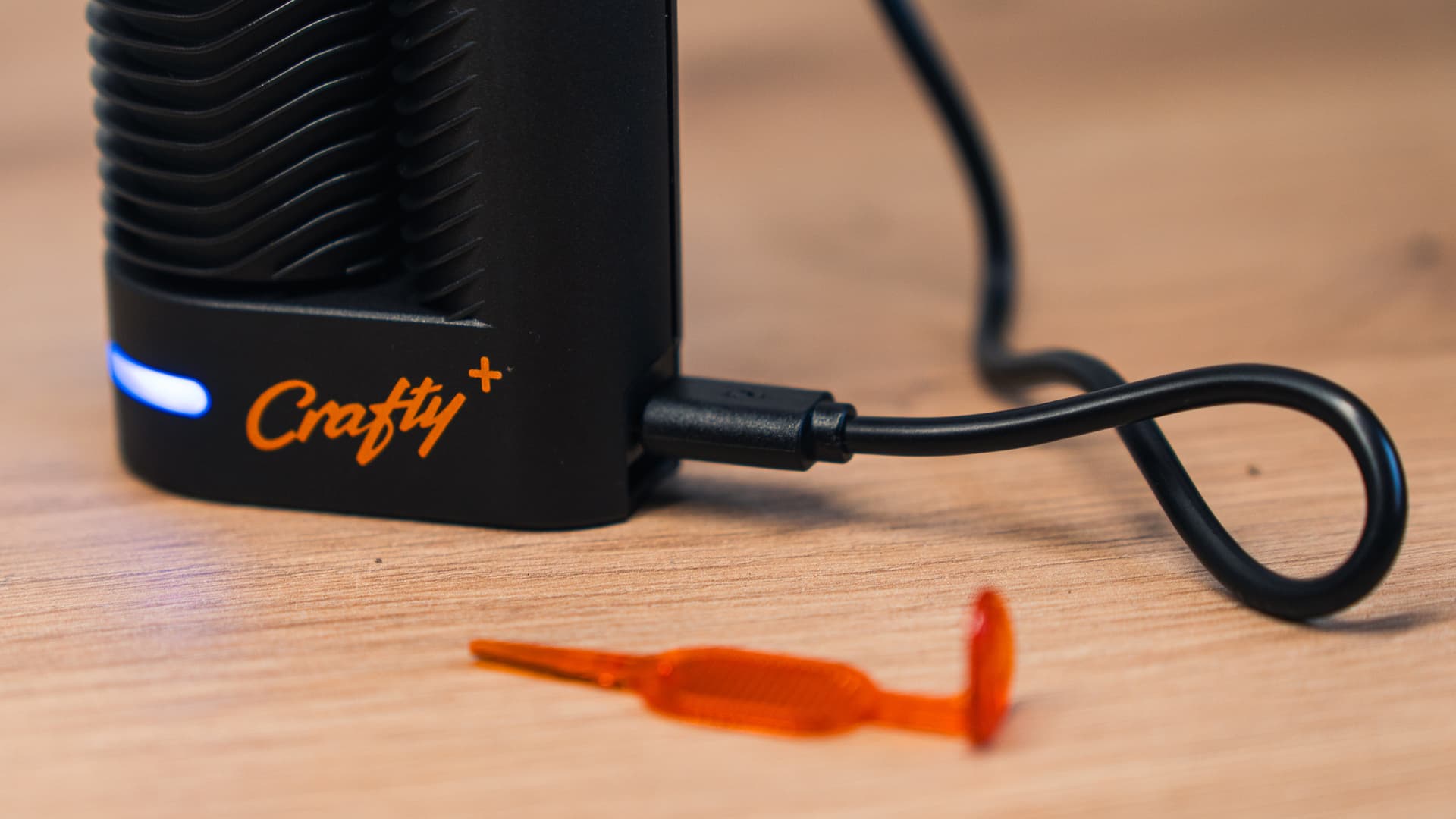
On the Crafty+, a blinking blue LED means it's charging and steady blue means it's full. No light at all? Try another cable first.
Vaporizer not producing vapor? Start here
When your vaporizer heats up but produces little or no visible vapor, work through temperature, grind, packing, moisture and draw before blaming the heater.
Is it actually working?
A cannabis vape puts out far less visible vapor than a joint puts out smoke, and a thin cloud at lower temperatures is normal. If you can taste it and your cannabis comes out an even light brown, it's working. Pale green bud after a full session means too little heat or a pack the air can't get through.
Your temperature is too low
Conduction and convection vapes behave differently, but both need enough heat to produce visible vapor. Wait for the ready signal before your first draw. If you're at around 185°C and seeing next to nothing, work up toward 200°C in 5°C steps. Our temperature guide explains what to expect from each range.
Your grind is wrong for your vape
Grind size controls how air moves through the oven. Too fine and the powder can pack into a wall that chokes airflow or slip through the screen. Too coarse and the big pieces heat unevenly. We cover grind consistency in detail in our grinding guide.
Tip
You're packing the oven wrong
Overpacking chokes airflow, and loose bits on the rim can stop the mouthpiece or cooling unit from sealing. As a rule, conduction ovens heat through contact, so they like a full, lightly tamped load. Convection ovens heat with hot air, so leave them loose enough for air to move through. Our convection vs conduction guide explains why. Either way, stay within your model's filling limit. The session or on-demand label won't tell you how to pack, but your manual will.
Your cannabis is too wet or too dry
Damp cannabis spends the heat drying out before it makes vapor. Bone-dry cannabis vaporizes in a few draws, tastes flat and crumbles into dust that clogs the screen. Store it airtight, ideally with a humidity pack, and you'll see denser vapor.
Your draw technique needs adjustment
New users often pull too hard and too fast. Try a slow, steady draw that feels comfortable, following any draw instructions in your manual. Some convection vapes reward a long, gentle pull, while a powerful heater keeps up with a harder one. Give it a few seconds past the ready signal so the whole load comes up to heat. If the vapor fades mid-session, let it cool, stir the load and try again before you raise the temperature. Our guide on how to inhale from a vaporizer covers the technique in detail.
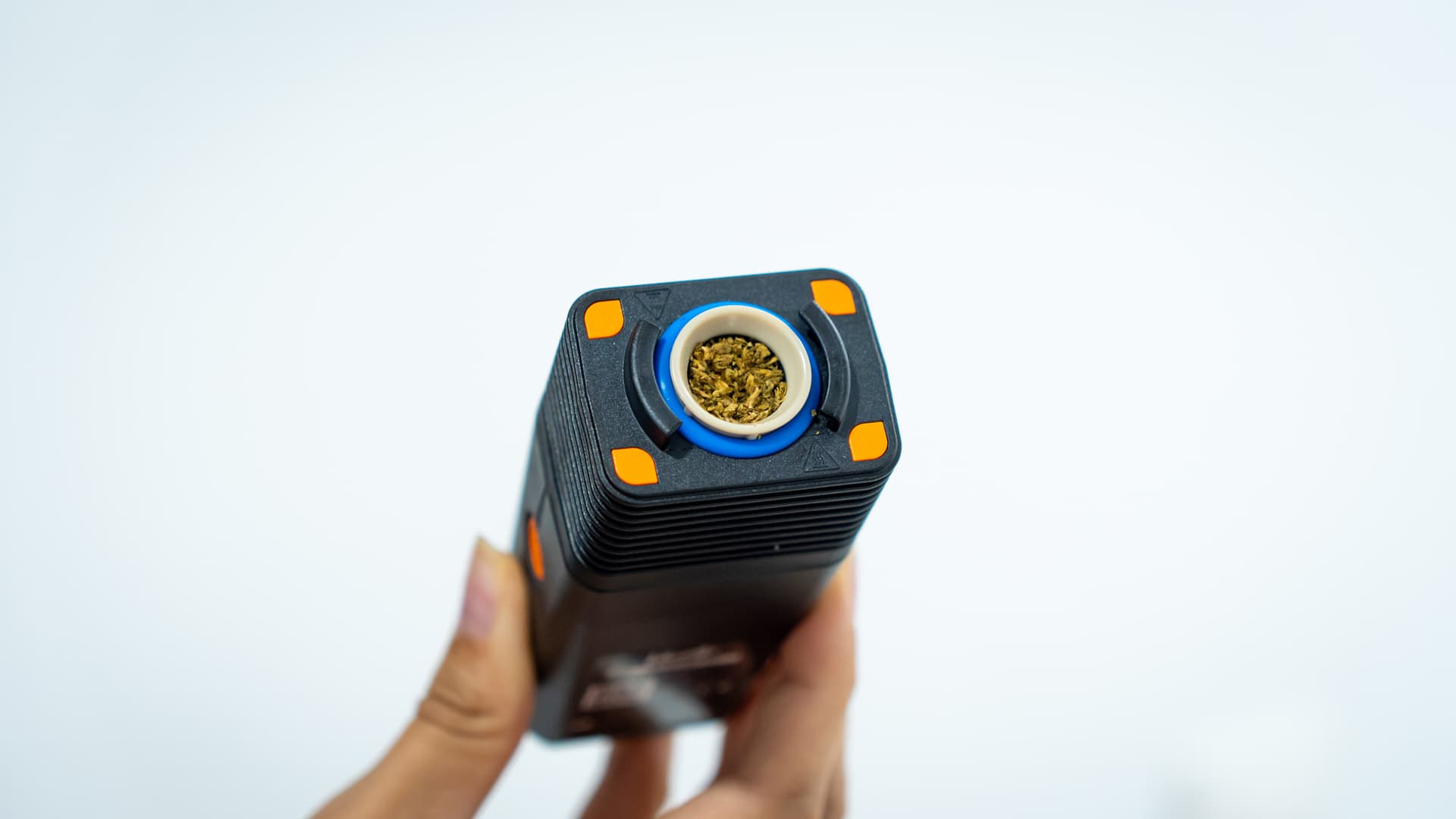
A loaded Venty chamber. Keep the rim clear so the cooling unit seats properly, and don't pack it so tight that air can't get through.
It powers on but never gets hot
Run it empty to its set temperature. If the temperature reading never climbs, the oven stays cold or the vape shuts off mid-heat, charge it fully and try again. Still cold means the heater or board, so contact the manufacturer with the error code if there is one.
Vapor tastes harsh or burnt
Harsh vapor that irritates your throat usually points to too much heat, a dirty oven, a spent load or restricted airflow. It gets worse the longer it's ignored, because residue keeps building up in the oven and airpath.
Tip
Lower your temperature. If you're running at 210°C and it feels harsh, drop to around 190°C. Higher settings make denser vapor, but it's hotter and rougher on the throat.
Clean the oven. Residue from previous sessions spoils the flavor and narrows the airpath, and it builds up with every session. Unplug the vape and let it cool first. Where the oven allows it, use a lightly damp alcohol swab and keep liquid out of the heater. Our cleaning guide has step-by-step instructions by model.
Clean or replace your screens. Mesh screens in the oven or cooling unit clog with resin over time, and airflow drops with them. A clogged screen can usually be brushed or soaked clean, including on the Mighty+ and Venty. Replace it when it's torn, bent, won't sit flat, or stays blocked after cleaning.
Check for combustion. If your cannabis comes out black and ashy instead of brown, or you see smoke, stop and let the vape cool. Check your temperature and how you packed it first. If it keeps happening on sensible settings, contact the manufacturer.
Airflow feels blocked or restricted
A vaporizer with blocked airflow forces you to pull harder, which makes sessions unpleasant. Draw resistance varies by design, so compare your vape with how it drew when new. If it used to sip like a wide straw and now feels like a coffee stirrer, something is blocked.
Warning
The mouthpiece is clogged
Start here. Vapor condenses inside the mouthpiece and cooling unit, gradually narrowing the air channel. Soak the removable glass and metal parts in isopropyl alcohol, then rinse and let everything dry completely before heating up again. Check the manual before soaking plastic parts or seals. The Crafty+ manual, for example, leaves the cap lock out and limits the soak to 30 minutes. On glass-stem vapes like the Arizer Solo 3, soak the glass on its own and keep liquid out of the body.
The oven is overpacked
If cleaning doesn't help and the filled oven draws much harder than the empty one, the pack is too tight. Remove some material and stay within your model's filling limit. Check that the screen, seals and mouthpiece are seated properly, too. Vapes with adjustable airflow like the Venty let you compensate somewhat, but even they can't clear a jammed oven.
The screen is clogged
Fine-mesh oven screens trap plant particles and resin. Brush or soak a clogged screen before replacing it, and keep a spare to use while the dirty one dries. Dosing capsules help by keeping loose material off the main screen, though vapor still leaves residue farther along the airpath. We explain the tradeoffs in our dosing capsule guide.
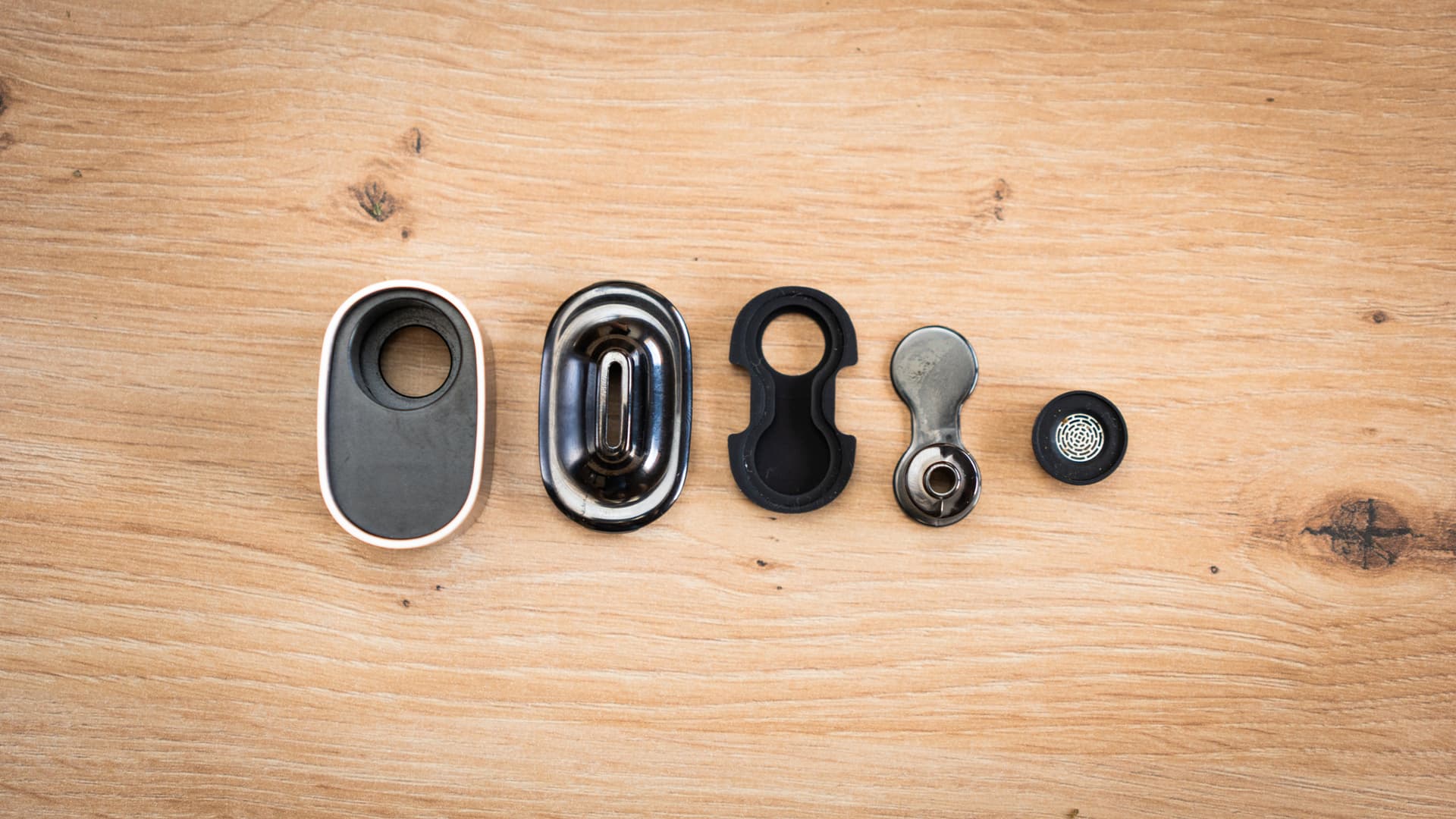
A mouthpiece and cooling parts taken apart for cleaning. Resin collects in this airpath, not just the oven, so only soak the parts your manual says can go in alcohol.
Battery drains fast or won't hold a charge
Lithium-ion batteries lose capacity with age and use. That's normal chemistry, not a defect. To judge it fairly, compare runtime at similar settings and session lengths. A sudden drop, unusual heat or a charging failure is different, and worth a call to support.
Avoid heat and a constant full charge. Heat and long stretches at 100% both wear lithium-ion cells faster. Keep your vape out of a hot car and unplug it once it's full. Charging to full before a day out is fine. Only vape while plugged in if your model supports pass-through charging.
Use the correct charger. A beefier phone charger won't force extra current into your vape, because USB Power Delivery negotiates the power. What matters is that the vape, charger and cable are compatible, and the easy route is the set that came with your vape. Our battery care guide covers the details.
Replaceable batteries are the easy fix. The Tinymight 2 takes a removable 18650 cell. When the original wears out, you swap in a new one instead of sending the vape in for service. Use a high-drain cell that meets Tinymight's spec, since not every 18650 is up to the job. Check the wrap and insulator for damage, match the polarity and carry spares in a plastic case.
Cold weather cuts battery performance. If your vape dies faster in winter, keep it in an inside pocket and let it warm up naturally. Don't charge it or put it on a heater while it's cold, and let any condensation clear first. The battery recovers once it's back to room temperature.
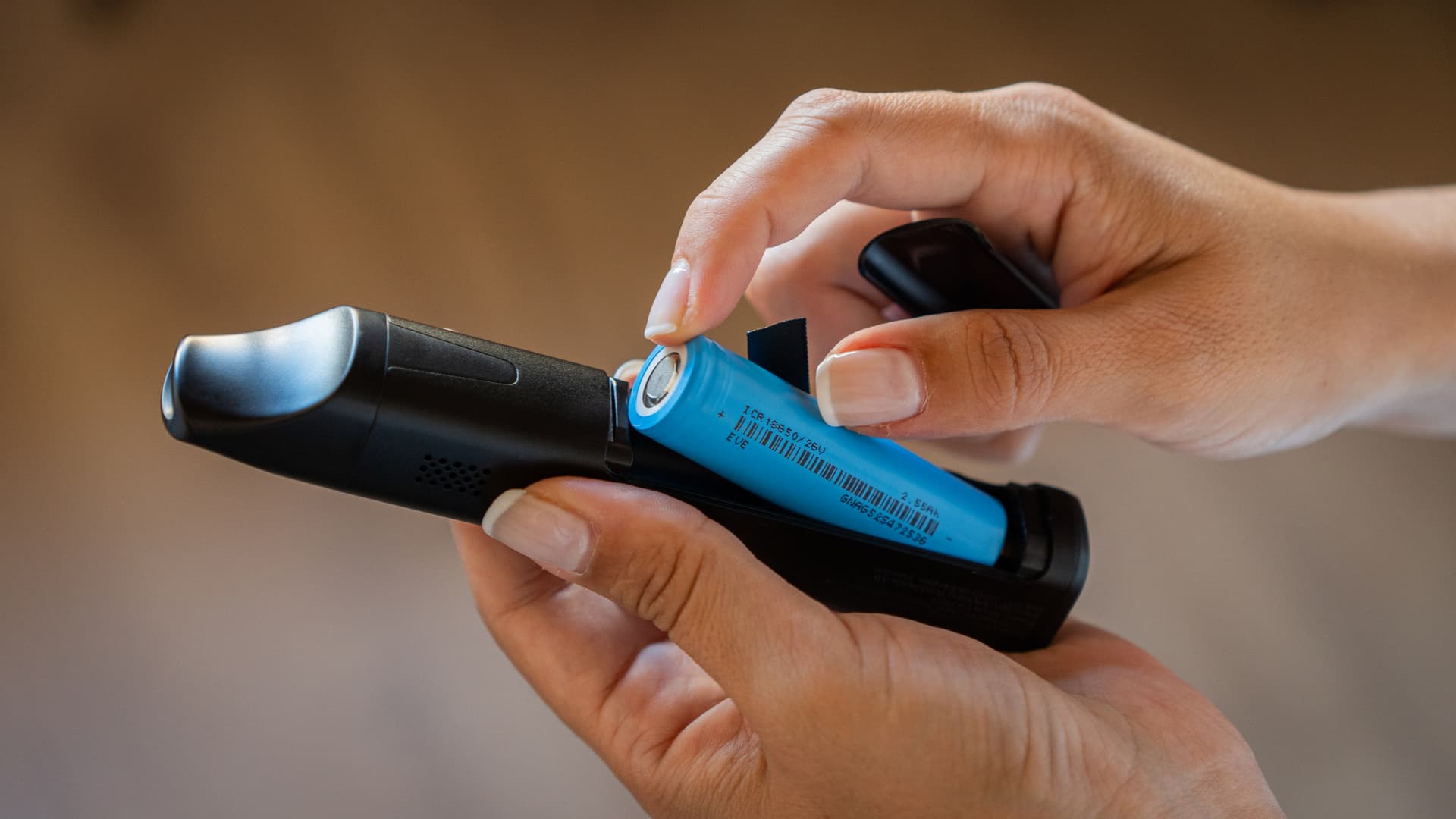
Swapping a removable cell at an open battery compartment. Check the wrap and insulator, use the right cell type and match the polarity.
The mouthpiece or shell gets too hot
Some warmth is normal, and some designs run warmer than others. New or excessive heat can point to a blocked airpath, bad assembly or a fault.
Let it cool between sessions. Back-to-back sessions let heat soak through the housing and mouthpiece. Set the vape on a heat-resistant surface and let it cool properly before the next round.
Cooling units matter. The Mighty+ and Venty route vapor through a removable cooling unit before it reaches your lips, so keep it clean and seated properly. Vapes without one, like some budget portables, tend to have a hotter mouthpiece. A glass mouthpiece adapter helps on vapes that take one, but it won't fix a vape that's overheating. Our accessories guide covers aftermarket cooling options. A water adapter cools the vapor further and lets you run a little hotter comfortably. Our vaporizer with a bong guide covers the setup.
Lower temperatures help. Running at 210°C or higher generates more heat overall, so dropping to around 190°C cools the shell and mouthpiece too. If the vape gets unusually hot while it's off or charging, stop using it and contact support.
App or Bluetooth connection fails
Vaporizers with app control like the Venty and Crafty+ occasionally lose their connection. Storz & Bickel's original app is gone from the Apple and Google Play stores, so you now connect through the S&B Web App in your browser.
Use a supported browser. S&B lists Chrome on Android and macOS, Chrome or Edge on Windows, and Bluefy or WebBLE on iOS. Your phone or computer also needs Bluetooth Low Energy.
Reconnect through the Web App. Switch the vape on, keep it close and pair it from the Web App's connection dialog, not your phone's Bluetooth menu. If that fails, close any other app or tab that may be connected, toggle Bluetooth and restart the phone and vape.
Check permissions. Allow your browser to use Bluetooth and scan for your vape. On Android, S&B also asks you to turn on Location Services. On iOS, allow Bluetooth for your browser in Settings.
Update firmware where available. Firmware updates can fix connection bugs. S&B offers them through the Web App for the Venty and Volcano Hybrid. Keep the connection steady while an update runs, and on iOS use Bluefy rather than WebBLE for updates.
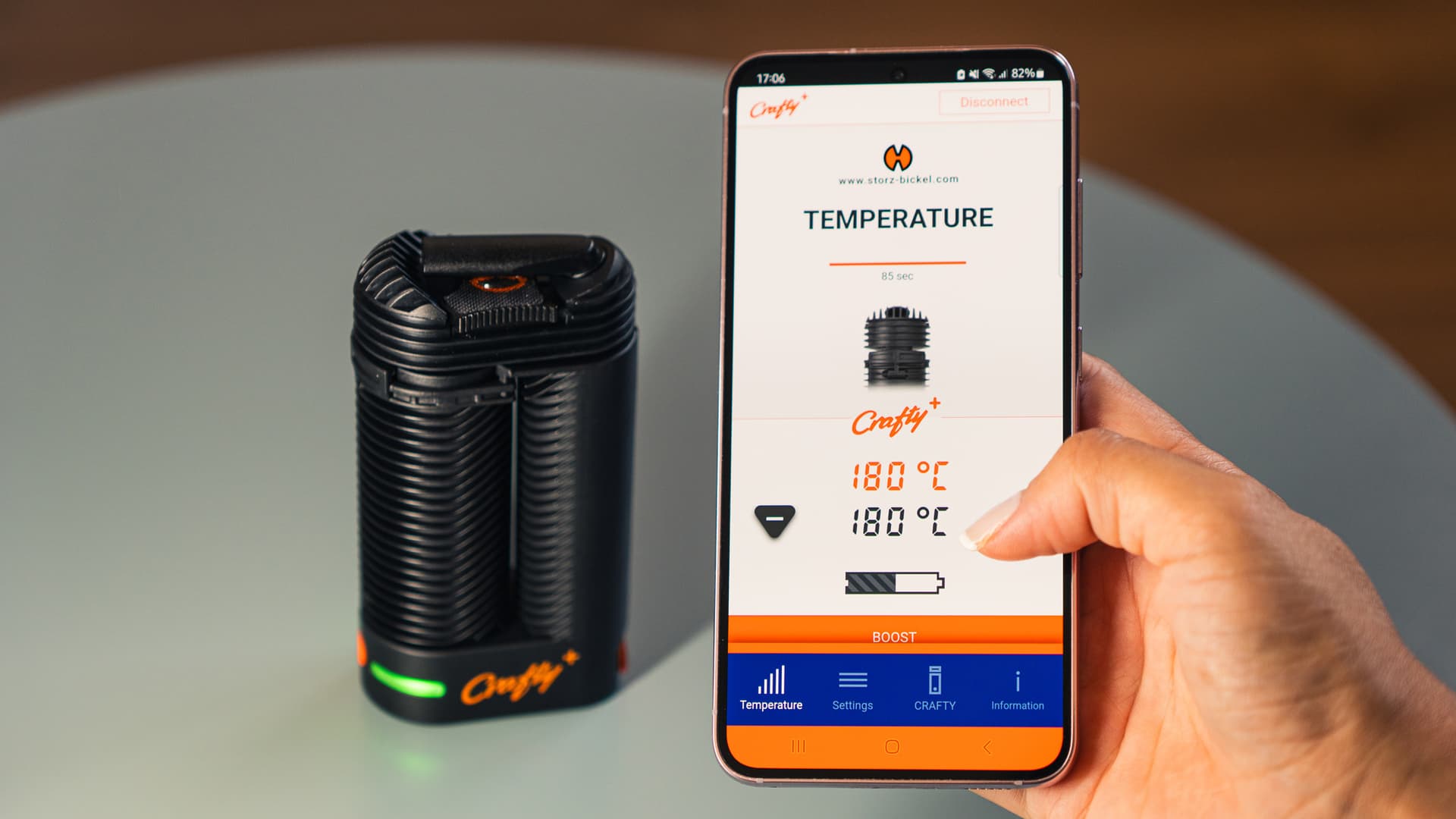
The Crafty+ has an LED instead of a temperature display, so you read the temperature in the app. Current and target values differ while it heats up, and that's normal.
Error codes and fixes by brand
When your vape shows a code or a strange light pattern, look it up here before you change anything else. These are the codes the makers list in their own manuals and support pages for the vapes we review, with the fix each maker gives. A code that comes back after the fix is a job for the manufacturer, so see when to contact the manufacturer.
Storz & Bickel
The Venty, Mighty+ and Volcano Hybrid show codes on their displays, while the Crafty+ and Veazy use LED signals. S&B lists the codes on its error codes page.
| Venty, Mighty+ | Meaning | Fix |
|---|---|---|
| ERR 001 | Battery too hot | Let the vape cool down |
| ERR 002 | Battery too cold | Move it somewhere warmer, and never warm it with an external heat source |
| ERR 003 | Wrong power adapter or USB-C cable | Use original S&B adapters and cables |
| ERR 004 | The vape is faulty | Switch it off, unplug it and contact the S&B Service Center. Don't repair it yourself |
| ERR 005 | Someone blew into the vape | Only inhale through it |
| bl | The firmware couldn't be verified | Run the firmware update, and contact the Service Center if it keeps failing |
On the Volcano Hybrid, a code ending in "r" calls for a reset and one ending in "n" needs service.
| Volcano Hybrid | Meaning | Fix |
|---|---|---|
| 01r | Internal communication error | Restart it: unplug it for at least 3 seconds, or hold HEAT for 10 seconds |
| 02r | Outside its temperature range, or overheated inside | Switch it off, unplug it and leave it at room temperature for at least 30 minutes. Contact the Service Center if it returns |
| 03r | Wrong mains voltage | Check whether yours is the 115V or 230V version and run it on the matching voltage |
| 04n | The vape is defective | Open a repair request (RMA) and send it to the Service Center |
| BL 000 | Firmware error | Update the firmware through the app, and contact the Service Center if the update fails |
Crafty+ LEDs (S&B's Crafty+ page):
- Red/blue blinking: the battery is too hot or too cold. Let it cool down or warm up.
- Red/green blinking: the USB-C cable isn't suitable. Use an original S&B cable.
- Red/orange blinking: a fault. Switch it off, unplug it and contact the Service Center rather than repairing it yourself.
Veazy LEDs (S&B's Veazy LED page):
- Lower LED steady red, upper LED blinking white/blue: too hot. Let it cool down.
- Lower LED blinking white/blue, upper LED steady red: too cold. Move it somewhere warm, with no external heat.
- Lower LED steady red, upper LED blinking white/red: the charger or USB-C cable isn't suitable. Use original S&B accessories.
- Both LEDs steady white: the vape is faulty. Switch it off, unplug it and contact the Service Center.
- Lower LED steady red, upper LED steady white: the firmware update failed. Run it again, and contact the Service Center if it keeps failing.
Arizer
The Solo 3 v2.0 pauses charging outside its safe temperature range and tells you on screen (Arizer's Solo III support page):
- LOW TEMP HOLD: the vape is below 3°C. Charging resumes once it warms above 3°C.
- HIGH TEMP HOLD: the vape is above 48°C. Charging resumes once it cools.
- ECO CHARGE is a setting, not a fault: charging stops at 80%. Hold UP while it's plugged in to charge to 100%.
PAX
The PAX 4, PAX Plus, PAX Mini 2 and PAX Flow warn you through their LED petals. PAX explains the signals for the PAX 4, Flow and Plus.
- All petals flash red and orange 4 times, then it shuts off (PAX 4, Mini 2, Flow): a high-temperature warning. Let it cool before the next session (PAX says 30 minutes for the PAX 4), and try a lower heat mode or shorter sessions.
- Top-left petal blinks red: low battery. Charge it.
- PAX Plus blinks blue, then shuts off: it's too cold. Leave it at room temperature for 1 hour and power it on 2 or 3 times. If it still won't start, reset it, then file a warranty claim.
Puffco
The Peak Pro, New Peak, Proxy and Pivot share one set of light signals (Puffco's Peak Pro support page):
| Light | Meaning | Fix |
|---|---|---|
| White flashes | The chamber isn't attached | Take the chamber off and seat it again. On the Proxy, line up the 3 prongs and don't force it |
| Red and white alternating | Chamber connection error | Soak the chamber in 90% or stronger isopropyl alcohol for 20 minutes (never water), let it air-dry completely and reattach it. On the Pivot, wipe the chamber and base connection with an alcohol swab |
| Solid red for 5 seconds | Overheating | Leave it alone until it cools and works again |
| Red, red, red | Low battery | Charge it fully |
A Peak Pro that flashes red and white with a new 3DXL chamber needs a firmware update in the Puffco app. If a signal keeps coming back after the fix, Puffco handles it through a warranty claim.
XMax
The XMax V3 Nano flags faults with its red light (XMax manuals):
- Red light flashes 5 times rapidly: short-circuit protection. Switch it off, take it off the charger and contact XMax support.
- Red light flashes 10 times rapidly: low battery. Charge it with the supplied USB-C cable and a charger of no more than 5V/1A.
Dr. Dabber
The Switch 2 signals faults with its LEDs (Dr. Dabber's Switch 2 knowledge base):
- 3 red flashes: a unit fault (board, short circuit, open circuit or charging fault). Contact Dr. Dabber support.
- 3 white flashes before heating: low battery. Charge it.
- Resets: with the Switch 2 on, press the power button 8 times and hold the 8th press for 10 seconds to reset its settings (the LEDs flash red, green and blue). For a board reset, hold the power button for 15 seconds or longer.
Bomb
The Bomb eRig Aerix flashes red when it's overheating, has a short circuit, runs low on battery or the atomizer isn't attached properly (Aerix manual). Check the atomizer and the charge, then switch it off and on again. If the red flashing stays, contact Bomb support.
Healthy Rips
On the Fury 3 and Rogue 2, Protect on the screen means the vape has hit an error, and Low Battery means it's time to charge with the included USB-C cable (Fury 3 manual). If Protect keeps coming back, start a warranty claim with Healthy Rips.
Ispire
The Ispire Daab shows its warnings on screen (Daab manual):
- No Load, with a red flashing light: there's no concentrate cup in the induction area. Seat the cup properly.
- TOO HOT: high-temperature protection. Wait 5 minutes for it to cool.
- Error 01: a sensor error. Error 02: overcurrent protection (the load drew more than 16A). Contact Ispire if either one keeps appearing.
Limelight
The Frolic has two warnings you never vape through (Limelight's FAQ):
- DEVICE TOO HOT: stop using it right away. The TCR setting needs recalibrating, and Limelight's support team walks you through it.
- CHECK HEATER: the heater is damaged, which happens when a Frolic keeps being used after it overheats. It goes back to Limelight for repair, and the warranty doesn't cover that damage.
MiniNail
On the MiniNail Flower Wand, EEEE on the controller means it isn't getting a proper reading from the heater coil, which happens when the coil is unplugged while the controller is on (Flower Wand instructions). Check the MiniXLR connection, make sure it's a MiniNail coil and try a different coil. Set the controller's HTR menu to FLOR for the Flower Wand.
Tafée
The Tafée Bowle 2 talks to you through its LEDs (Tafée's troubleshooting page):
- White, pink or red LEDs on a new Bowle in standby: a harmless firmware test signal. It stops after a few full charges, and a click of the small power level button turns it off.
- LEDs turn green, then drop back to blue during use: the red O-ring around the ceramic pot is missing or badly seated. Reseat it, and reset the Bowle if it continues.
- Blue charging LEDs, but it won't switch on off the charger: a charging surge put it into a safety lockout. Contact Tafée support.
- To reset: unplug it, switch it on and, in standby, click Fire and Power Level Select together rapidly at least 5 times until it shuts down and stays off. Charge it for an hour to wake it.
XVape
On the XLUX Roffu, SENSOR ERROR or SHORT CIRCUIT on the screen gets the same fix from XVape: switch it on a few more times so it warms up, and move somewhere warmer if the room is cold (XVape's Roffu FAQ). The sensor protection trips when the heater warms too slowly in the first 10 seconds. Contact XVape if the message stays.
Yllvape
The Angus Enhanced flashes combinations of its LEDs (Yllvape's Angus Enhanced FAQ):
| LEDs flashing | Meaning |
|---|---|
| 1 and 2 | Heating element open circuit |
| 2 and 3 | Probe short circuit |
| 3 and 4 | Probe open circuit |
| 1 and 5 | Balance line open circuit |
| 1, 2 and 3 | One battery cell below 2.5V |
| 3, 4 and 5 | One battery cell dropped below 2.5V during use |
| 6 flashes | Low battery |
| Flashing in a loop | High-temperature alarm, which clears once it cools to 65°C |
It won't power on at all with the batteries in the wrong way round, so match the polarity marks when you insert them. Contact Yllvape for a circuit fault that keeps coming back.
Zenco
On the Zenco Duo, 3 red flashes after cleaning or poking at a coil mean the coil has shorted. Replace the coil, since Zenco treats coils as replaceable parts outside the warranty (Zenco's how-to-use page).
When to contact the manufacturer instead of troubleshooting
Some problems need professional repair. Contact your manufacturer's support team if you notice any of these, with your model, serial number, receipt and the checks you've already tried.
Error codes that keep coming back need attention. Look the code up in your manual's fault table, since some point to a simple power or temperature issue. If it returns, stop using the vape and contact support.
Visible damage to the heater or oven chamber (cracked ceramic, warped metal, melted parts) or a damaged charging port means the vape needs checking before you use it again. A damaged heater can create hot spots that burn your cannabis instead of vaporizing it.
Swollen batteries are a safety hazard. If your vape's housing bulges or it gets unusually hot while off, stop using and charging it and contact the manufacturer. Never open or puncture a swollen battery.
Arizer Solo III recall. Selected Intergalactic Black Solo III units sold in the US and Canada are part of a June 18, 2026 battery fire-hazard recall, so check your serial number against Arizer's eligibility list.
Warranty coverage varies. Register your vape within the manufacturer's window, because some warranties and extensions depend on it.
| Brand | Vape | Warranty |
|---|---|---|
| Storz & Bickel | Venty, Mighty+ | 2 years, plus 1 more with registration within 4 weeks |
| Tinymight | Tinymight 2 | 3 years from delivery for the original owner, with registration within 1 year; batteries, glass and wear parts excluded |
| Arizer | Solo III v2.0 | Lifetime on the heater, 2 years on materials and workmanship, 1 year on the battery; glass excluded |
Check the full S&B terms, Tinymight warranty conditions or Arizer's Solo III support page for your model and country, since older Solo 3 units have their own terms.
Some out-of-warranty repairs you can handle yourself. Screens, O-rings, mouthpieces and user-replaceable batteries are simple swaps if the part matches your model. Heater, board or sealed-battery repairs should go back to the manufacturer or a qualified repair service. Check your warranty terms first, because damage from a third-party repair may not be covered.
Ready to replace a vape that's past saving? See our best portable vaporizers.
Common troubleshooting mistakes
- Expecting smoke-sized clouds from a cannabis vape
- Drawing before the ready signal, while the oven is still heating up
- Packing past the fill line, which chokes airflow
- Grinding to powder, which clogs the screen and the airpath
- Vaping a spent load, which gives thin, toasty vapor however hot you run it
- Cleaning an oven that's still hot instead of letting it cool first
- Changing several settings at once, so you can't tell what fixed it
- Charging a vape that's still cold from outside
The complete vaporizer cleaning guide
Step-by-step deep cleaning by model, with the tools and routine that help keep these problems from coming back.
Key Takeaway
- Dirty oven, wrong temp, bad pack: check all three before assuming hardware failure
- Brush the oven after every session and deep clean when you see buildup or the draw gets harder
- Match grind and pack to your vape: start with the manual, not the session or on-demand label
- Clean screens before replacing them, and swap them when they're damaged or stay blocked
- Contact the manufacturer for repeat error codes, swollen batteries, or cracked heaters